
At a glance
Key takeaways
- Collection is the start of the loop, not the outcome.
- Every feedback item needs a clear state, even when the answer is “not now.”
- A small weekly review habit is more valuable than a complicated process nobody follows.
What a customer feedback loop actually means
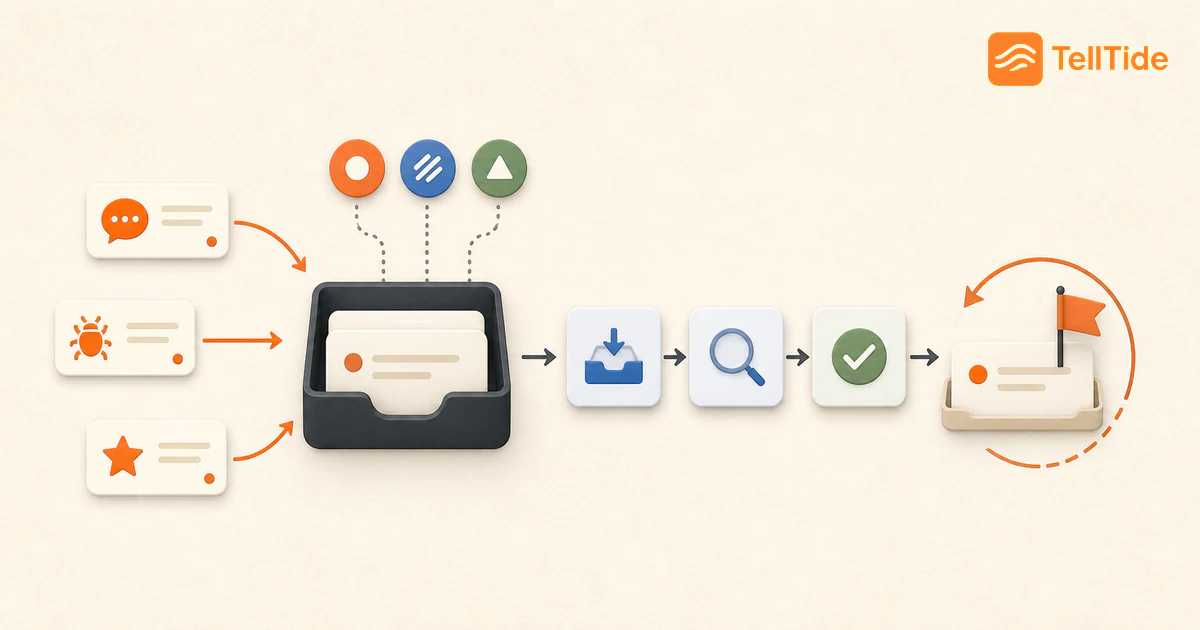
The loop begins when a customer shares an observation, problem, rating, or request. Your team then adds context, decides what the signal means, takes an appropriate action, and communicates the result. The last step is what turns collection into a relationship.
Not every request needs to ship. Closing the loop can mean fixing a bug, asking a follow-up question, explaining a workaround, publishing a roadmap item, or clearly declining an idea that does not fit the product.
The five stages of a useful feedback loop
- Collect feedback where the experience happens through a widget, API, interview, or support conversation.
- Organize each item by product, feedback type, status, and relevant customer context.
- Decide whether to investigate, fix, validate, publish, defer, or decline.
- Act in the product and update the internal state so the decision does not disappear.
- Communicate progress in the channel the customer can actually see.
A lightweight weekly feedback review
Set aside 30 minutes once or twice a week. Review new submissions, group obvious duplicates, change statuses, and choose the few items that deserve a deeper conversation. Keep the meeting small: one product owner and the customer-facing teammate closest to the context is often enough.
Finish by checking open promises. If a public roadmap item moved forward, update its status. If a bug was resolved, close it. If the team needs more information, ask while the original experience is still fresh.
| Question | Why it matters |
|---|---|
| Is this new or repeated? | Repeated pain may deserve broader investigation. |
| Who is affected? | A blocker for a key workflow may outweigh raw vote count. |
| What outcome does the user need? | Requests often describe a solution rather than the underlying problem. |
| What will we communicate? | A decision without follow-up leaves the loop open. |
How TellTide supports the full feedback loop
TellTide gives the loop one path: the widget or API captures the signal, the inbox helps your team triage it, and the public roadmap gives selected feature requests a visible place for votes, comments, and progress.
That shared path is especially helpful for a small team. Support does not need to maintain a separate spreadsheet, product can see the original message, and customers have somewhere to check before sending the same request again.
Example: closing the loop on a recurring request
Assume several customers ask for saved report filters. Do not jump from vote count to commitment. First, group the requests by the job customers are trying to complete: some want a faster morning routine, while others need consistent views across a team. Interview a few reporters, verify the repeated problem, and define the smallest change that would remove the friction.
When the team decides to build, publish a narrowly worded roadmap item and update its status as work progresses. After release, contact the original reporters with the exact behavior that shipped and ask whether it solved their use case. Their replies become evidence for the next iteration instead of disappearing into a “delivered” column.
A feedback-loop scorecard
- percentage of new submissions acknowledged;
- time from submission to a clear internal decision;
- percentage of roadmap changes communicated to affected customers;
- number of delivered changes validated with the original reporters; and
- repeated requests that remain ungrouped or without an owner.
Collection volume alone is not success. A smaller system that produces decisions and follow-up is healthier than a large inbox nobody trusts.
What to say when the answer is not a release
A follow-up should state the decision, its scope, and the next step. For a deferred request: “We understand that exporting each workspace separately adds work. We are keeping the request under review, but have not scheduled a combined export. For now, this documented workaround is available.” Only mention a workaround you have verified.
For a shipped change, name the exact behavior and ask whether it resolves the original problem. Avoid telling every reporter that their request is solved when the release covers only one variation.
These are illustrative communication templates, not customer testimonials. In TellTide, roadmap statuses and comments provide visible progress; private email follow-up must be handled through your existing communication channel. Do not assume changing a status automatically emails a reporter. See public roadmap setup.
Put this into practice: Get Pro
Questions teams ask before choosing this workflow
What are the stages of a customer feedback loop?
A practical loop has five stages: collect, organize, decide, act, and communicate. The loop closes when the customer can understand what happened.
How do you close the customer feedback loop?
Give the feedback a clear status, take the appropriate action, and follow up through a direct response, roadmap update, or visible product change.
How often should a SaaS team review feedback?
Small teams should usually review new feedback at least weekly. High-volume products may need daily triage and a separate weekly prioritization review.

Abhijith
Founder of TellTide, writing practical guides about product feedback, feature requests, and public roadmap workflows for SaaS teams.