At a glance
Key takeaways
- Centralize feedback before trying to analyze it: every channel should end in one inbox.
- Give every reviewed item one of three outcomes (act, watch with a review date, or decline) so nothing waits forever.
- Measure response and decision quality, not just submission volume.
The minimum feedback management system you need
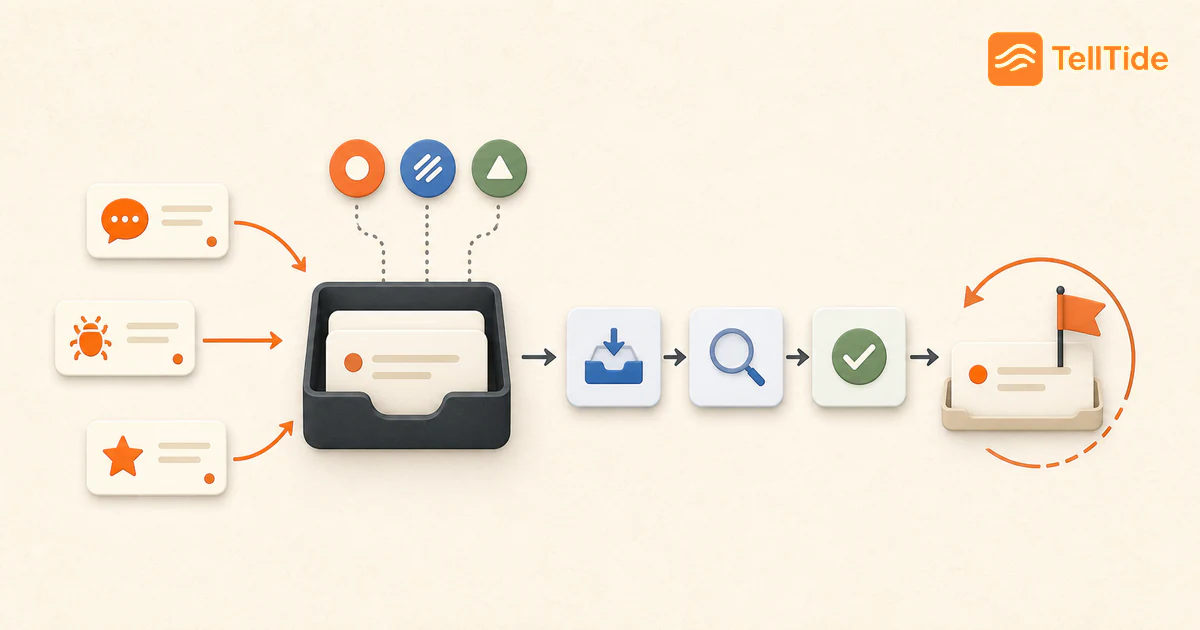
Start with one intake path, one inbox, one owner, and one review schedule. Feedback can still arrive through conversations, but important details should end up in the same place before the team makes a product decision.
Separate feedback by intent as early as possible:
- Bugs need reproduction steps and urgency.
- Feature requests need the problem behind them and some validation.
- Reviews need sentiment and, for good ones, permission to quote.
- General feedback often needs one clarifying question.
That is the whole system. Everything else in this guide is about keeping it running when nobody's job title includes "feedback".
Get every channel into one inbox
In a small team, feedback arrives everywhere: support email, live chat, sales calls, social replies, app store reviews, and comments in your community. You do not need to stop people using those channels. You need a habit of moving the useful part into one place.
| Channel | What usually arrives | How it reaches the inbox |
|---|---|---|
| In-product feedback button | Bugs with page context, ideas, reviews | Lands there directly |
| Support email and chat | Bugs and "can it do X?" questions | Whoever answers logs the request, with a link to the conversation |
| Sales and onboarding calls | Missing capabilities, objections | The person on the call logs it the same day |
| Social, community, app stores | Praise, complaints, public requests | Weekly sweep by the triage owner |
The rule that matters: log the customer's words and a link to the original conversation. Paraphrases drift, and you will want to reply to the person later.
Who does what in a one-to-three-person team
Small teams do not need a feedback operations role. They need named owners for three jobs:
- Triage owner (often support or the founder): reads new submissions, merges duplicates, asks for missing context, and keeps the inbox at zero untriaged items.
- Decision owner (founder or product owner): decides on requests that affect positioning or roadmap scope.
- Engineering joins only when technical feasibility or incident severity needs judgment.
One person can hold two roles. What breaks is when nobody holds the triage role and everyone assumes someone else has read the inbox.
A feedback process your small team can maintain
| When | Action | Owner |
|---|---|---|
| Daily, 10 minutes | Acknowledge urgent bugs and customer blockers. | Triage owner |
| Weekly, 30 minutes | Triage new feedback, update status, group repeated needs, make decisions. | Triage and decision owners |
| Monthly | Review themes, roadmap candidates, and old open items. | Founder and product |
| After a decision | Update the customer or the public roadmap. | Request owner |
Keep a separate urgent-support path. A weekly review is not an incident-response process.
Give every item one of three outcomes
Each reviewed item leaves the meeting with one outcome:
- Act now. Fix it, build it, or answer it, and assign an owner.
- Watch. Not enough evidence yet. Give it a review date or an evidence threshold, such as "three more affected accounts", so "watch" never becomes a permanent backlog.
- Decline. Say no with a reason and tell the requester. A clear no is kinder than months of silence.
This keeps the inbox from turning into a second issue tracker.
A 30-minute weekly review agenda
Copy this into your calendar invite or meeting notes. The times are a suggested split, not a measured benchmark.
Weekly feedback review (30 min)

Before the meeting (triage owner)
- Classify new items by type and merge obvious duplicates
- Flag anything that needs a decision today

1. Blockers (5 min): anything stopping customers from working?
2. Repeated problems (10 min): which problems came up more than once,
   and from how many different accounts?
3. Decisions (10 min): act / watch until {date or threshold} / decline
4. Replies (5 min): who needs to hear what, and who sends it?

Output: a short note with actions, owners, and next review dates
If the whole session is spent reading submissions aloud, move the classification step before the meeting.
Worked example: one week of feedback
Here is an illustrative week for a three-person B2B product.
Twenty-three items came in: 14 through the feedback button, 6 from support conversations, and 3 from a sales call. Before the meeting, the triage owner classified them as 7 bugs, 9 feature requests, 4 reviews, and 3 general comments. Two bugs were duplicates of the same export failure.
In the meeting:
- Blockers: the export failure affected four accounts. It went straight to engineering as "act now", and the four reporters were told it was being investigated.
- Repeated problems: five of the nine requests described the same pain, sending reports to clients by hand, worded five different ways. They were merged into one request with five linked accounts.
- Decisions: the reporting request moved to "watch until the end of the month" while the founder booked two calls. Two requests that did not fit the product were declined with a reason. The rest were acknowledged.
- Replies: the triage owner sent seven short replies the same afternoon.
Result: 23 items in, zero left unread, three real decisions, and every reporter heard back. Nobody needed a scoring model. When the reporting request does compete with other work, a quick score with the RICE calculator will make the trade-off easier to explain.
Minimum fields worth maintaining
Keep a record for each item with these fields and nothing more until you need it:
- feedback type and source;
- customer or account context when available;
- the problem being experienced, not only the requested solution;
- current status and a named owner;
- related submissions or roadmap item; and
- the next review date when no decision has been made.
Avoid custom scoring systems until the team can reliably maintain the underlying data. Clear ownership, consistent review, and customer follow-up create more value than a formula with stale inputs.
Simple customer feedback metrics to watch
Submission count is useful for capacity planning, but it does not tell you whether the process works. Track a few things you can count by hand:
- Time to first reply: how long until a person acknowledges a submission.
- Untriaged items at the start of each weekly review. This should trend to zero.
- Repeat problems: how many distinct accounts mention each top problem.
- Closed loops: how many resolved items led to a message back to the requester.
Remember that feedback describes what people say. Check the big themes against behavior in your product analytics; as the Nielsen Norman Group puts it, pay attention to what users do, not only what they say. For roadmap ideas, ten thoughtful use cases are often more valuable than a hundred unexplained votes.
When to add more process
Run this routine for a month before adding anything. Then add structure only where the review history shows a repeated bottleneck: tags when the same themes keep coming up, a scoring step when decisions keep stalling, a public roadmap when customers keep asking "is this planned?". The feedback question generator helps when you need more context than the original submission gave you.
How TellTide keeps feedback management lightweight
TellTide gives small teams a widget or API for collection, structured feedback categories, an inbox with filters, statuses, and internal comments, and an optional public roadmap. Your team gets an email when new feedback arrives, and submitters get an email when their request's status changes or you reply.
Create one app for each product or site (Pro includes unlimited apps), install the widget, and review submissions from all apps or one at a time. Publish only the feature requests that benefit from public votes and comments. For reply wording, see how to respond to feature requests and the feedback loop guide.
Run the weekly triage in one inbox: Get TellTide Pro for $19/month flat, with unlimited apps and no per-seat pricing.
Questions teams ask before choosing this workflow
What is customer feedback management?
Customer feedback management is the process of collecting, organizing, reviewing, acting on, and responding to customer input across the product experience.
What feedback workflow works for a small SaaS team?
Use one central inbox, clear feedback categories, a weekly triage owner, simple statuses, and a reliable way to update customers after decisions.
How much time should a small team spend on feedback each week?
Plan for a short daily check for urgent issues and one focused weekly review. If the weekly review regularly runs long, classify submissions before the meeting rather than reading them aloud during it.
Does TellTide support more than one product?
Yes. Each TellTide app represents a product or site, and Pro includes unlimited apps, so you can review one product at a time or all of them together.
Research notes
Sources reviewed
These references support the discussion above. Specific pricing checks are dated in the article; its editorial update date does not imply that every linked page was reverified. Confirm plan availability with each vendor.

Abhijith
Founder of TellTide, writing practical guides about product feedback, feature requests, and public roadmap workflows for SaaS teams.