
At a glance
Key takeaways
- Capture feedback at the moment of experience and attach useful product context automatically.
- Keep bugs, reviews, general feedback, and feature requests distinct so each follows the right workflow.
- Evaluate the full path from submission to decision and customer follow-up, not only the in-app form.
When in-app feedback is more useful than a later survey
An in-app feedback tool for SaaS captures the user while the product moment is still fresh. That is the difference between a vague email survey response and a useful report tied to a page, feature, or workflow.
For product teams, context is the real value. A user can leave product feedback after hitting friction, report a bug from the screen where it happened, or submit a feature request while evaluating whether your product solves the job.
A later survey can still be useful for reflecting on a longer experience. Choose the timing based on the decision: capture immediate friction in context, and ask about broader value after the user has had time to evaluate it.
What a SaaS feedback tool should collect
The best customer feedback management software separates feedback by intent. A bug report should not look like a feature request. A product rating should not get buried beside a long roadmap idea.
- Product feedback for usability issues, missing context, and confusing flows.
- Bug reports with enough detail for support or engineering to reproduce the issue.
- Feature requests that can become roadmap candidates instead of private notes.
- Reviews and ratings that help product and growth teams understand sentiment.
- Account or app context so feedback can be filtered by source, plan, product, and customer segment.
In-app feedback tool evaluation checklist
Use this checklist when comparing product feedback tools. It keeps the decision focused on workflow fit instead of long feature pages.
| Capability | Why it matters | What to ask before buying |
|---|---|---|
| In-app capture | Feedback is more useful when it happens inside the product moment. | Can users submit feedback from the page or app flow where the issue happened? |
| Feature request software | Roadmap ideas need voting, deduplication, status, and follow-up. | Can requests move from inbox to public roadmap without copying between tools? |
| Bug reporting | Support and engineering need reproducible context. | Can the tool collect issue type, description, page source, and user details? |
| Customer feedback management | Growing teams need routing, status, and ownership. | Can the inbox handle statuses, filters, and team review? |
| Feature voting tool | Votes show demand, but need context before prioritization. | Can users vote and comment while the team still controls roadmap decisions? |
| Setup and UX | A heavy widget can hurt conversion and adoption. | Can the launcher be customized and installed without redesigning the app? |
A clean feedback workflow for SaaS teams
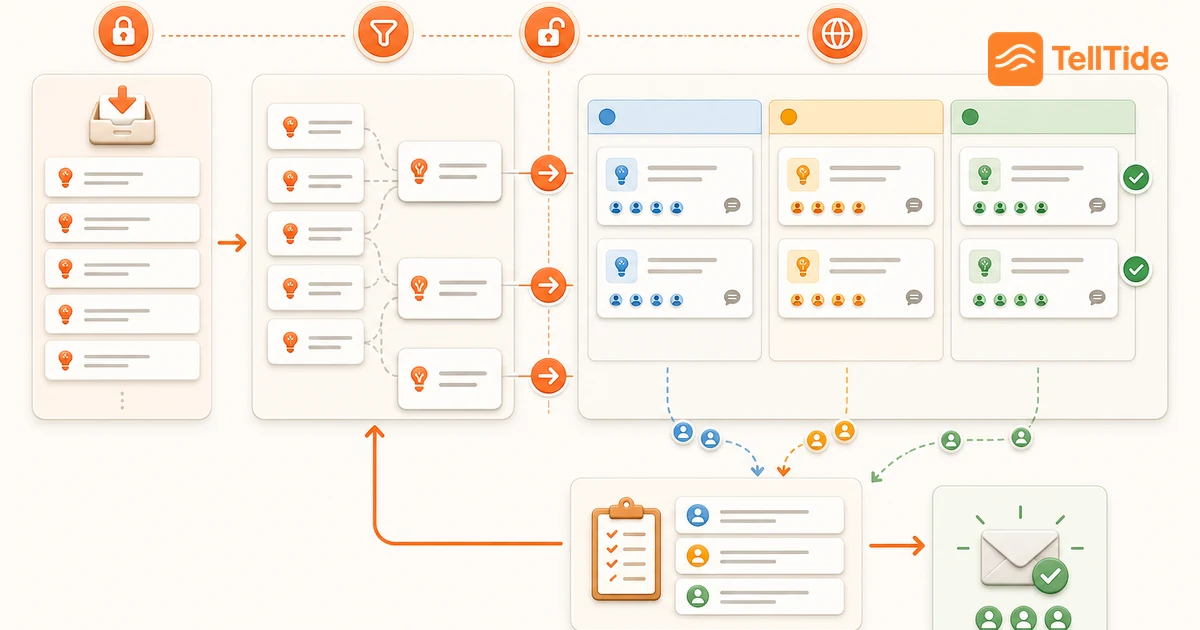
A clean workflow starts with capture, then moves into triage, prioritization, and loop-closing. Without those steps, even the best customer feedback tool becomes a storage bin.
First, capture feedback in-app through a widget or API. Second, triage submissions by type, status, source, and app. Third, promote strong feature requests to a public roadmap or voting board. Finally, update users when an idea is planned, shipped, or declined.
This workflow works because it matches how SaaS teams actually operate: support needs quick context, product needs demand signals, engineering needs reproducible issues, and users need proof that feedback is not ignored.
Avoid overbuilding your feedback stack
Many teams start by combining a survey tool, a support inbox, a feature voting tool, a public roadmap tool, and a spreadsheet. That setup can work for a large organization, but it creates drag for early SaaS teams.
If your goal is more qualified feedback and more conversions, start with the smallest system that covers the full loop: collect, review, prioritize, and respond. Add specialized tools later only when the workflow is already proven.
Where TellTide fits the intake workflow
TellTide is designed for SaaS teams that want one lightweight path for in-app feedback, product feedback, bug reports, feature requests, and public roadmap voting.
You can install the widget on your site, use the API for custom products, triage submissions in the dashboard, and move high-signal requests into a roadmap users can vote on. That keeps the feedback loop visible without forcing a large product operations stack.
Web embeds and native app intake need different work
A browser widget can be installed on a website, but that does not make it a native iOS or Android SDK. For a native application, plan the form, submission request, loading state, retries and success message as part of your own implementation. An HTTP API is a transport option, not a prebuilt mobile user interface.
Give users a clear way to tell whether their message was accepted. Retrying a failed-looking request can produce duplicates unless the integration handles that scenario. Test poor connectivity and expired credentials in a development environment before rolling out.
TellTide supports widget and API submission paths. Use the integration docs for supported payloads and credential handling. For who should approve the purchase and rollout, read the buyer-role guide.
Put this into practice: Get Pro
Questions teams ask before choosing this workflow
What is an in-app feedback tool?
An in-app feedback tool lets users submit product feedback, bug reports, ratings, or feature requests from inside a website, web app, mobile app, or product workflow.
What is the best feedback tool for SaaS teams?
The best tool depends on the workflow. SaaS teams usually need in-app capture, an inbox for triage, feature request management, and a public roadmap or feature voting flow.
How is TellTide different from a survey tool?
TellTide is built around product feedback workflows, not only surveys. It supports widget and API feedback capture, inbox triage, bug reports, feature requests, and public roadmap voting.

Abhijith
Founder of TellTide, writing practical guides about product feedback, feature requests, and public roadmap workflows for SaaS teams.