
At a glance
Key takeaways
- A hosted feedback widget is one script tag before </body>; a do-it-yourself button needs a form, storage, and an inbox you build yourself.
- Ask for the type of feedback first (bug, idea, review) and capture the page and browser automatically, so users type less and you can reproduce more.
- Most failed installs come from three things: the wrong domain, a Content Security Policy that blocks the script, or testing from a preview URL.
The short answer
Adding a feedback button takes three steps, whatever your site is built with:
- Get the snippet. Sign up for a feedback tool (or build your own form) and copy the embed code.
- Paste it before the closing
</body>tag in the template that every page shares: a footer include, a root layout, or your site builder's custom code box. - Submit one test from your live site and check that it lands in your inbox.
With TellTide, the whole snippet is this:
<script
  src="https://telltide.com/src/widgets/widget.js"
  data-app-id="YOUR_APP_ID"
></script>
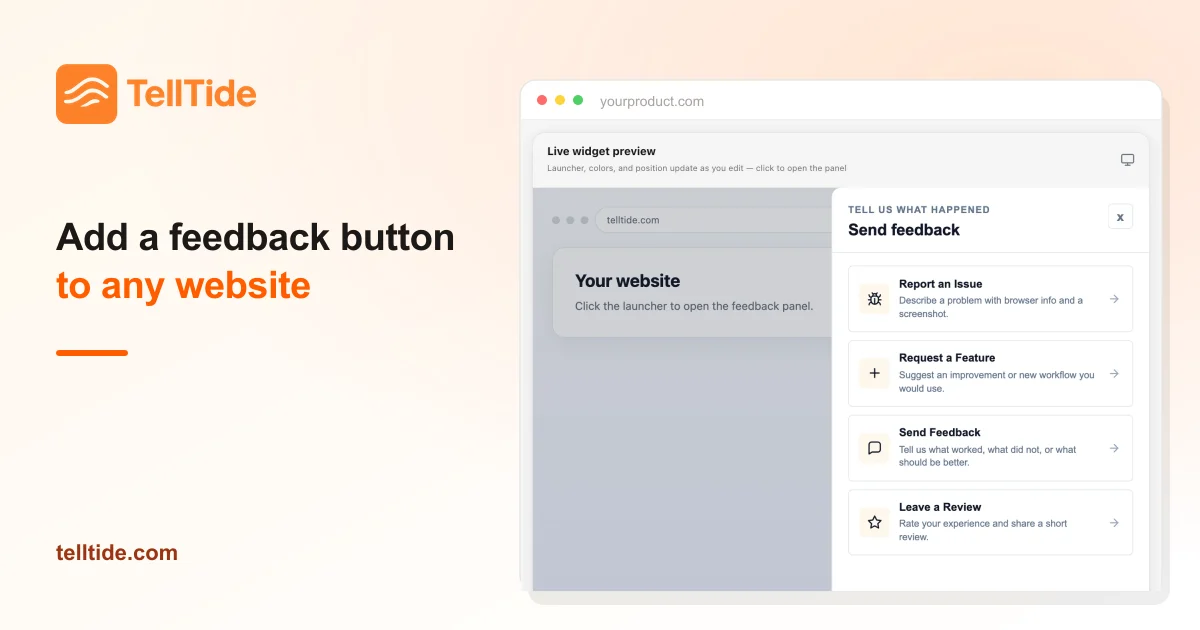
A launcher tab appears in the corner. Users pick what they want to send (a bug, a feature request, general feedback, or a review), and the submission lands in a private inbox with the page and browser attached.
The rest of this guide covers the do-it-yourself alternative, where to paste the snippet on your platform, and the checks that catch most failed installs.
Option 1: build a basic feedback button yourself
If you only want a way for people to email you, a fixed-position link is enough:
<a href="mailto:you@yourproduct.com?subject=Feedback" class="feedback-btn">Feedback</a>

<style>
  .feedback-btn {
    position: fixed; right: 16px; bottom: 16px; z-index: 1000;
    padding: 10px 16px; border-radius: 999px;
    background: #111; color: #fff; font: 600 14px/1 system-ui, sans-serif;
    text-decoration: none;
  }
</style>
It works, and it costs nothing. The trade-offs show up within weeks:
- You lose the context. Nobody includes the page URL, the browser, or a screenshot unless you ask.
- Bugs, ideas, and praise arrive mixed together in your email, with no status and no owner.
- Many users on phones or work machines have no mail client set up, so the link does nothing.
- There is no way to tell users when their request ships, which is why they stop sending feedback.
A form that posts to your own backend fixes the first and third problems, but then you are building storage, spam protection, an inbox, and notifications. For a side project that is fine. For a product with paying users, a hosted widget is usually cheaper than the time.
Option 2: use a feedback widget
A hosted widget gives you the button, the form, and the inbox from one script tag. Before you pick one, check four things:
| Check | Why it matters |
|---|---|
| Typed categories (bug, idea, review) | Sorting happens at submission time instead of in your head. |
| Automatic page and browser context | You can reproduce bugs without a back-and-forth. |
| Restyling without a redeploy | You will change the label and colors more than once. |
| Pricing that does not grow per user or per seat | Your feedback volume should not set your software bill. |
TellTide covers all four. It is $19 a month flat on one Pro plan with unlimited apps, and the Pro plan page lists everything included. If you are still comparing tools, the feedback widget evaluation checklist goes deeper.
Where to paste the snippet on your platform
The snippet is the same everywhere; only the paste location changes. Each link below is a step-by-step guide that shows exactly where that platform keeps its custom code setting.
| Platform | Where the snippet goes | Guide |
|---|---|---|
| Plain HTML | Before </body> in your shared footer | HTML websites |
| WordPress | Theme footer, a Custom HTML block, or a header/footer plugin | WordPress |
| Webflow | Site settings → Custom code → Footer code | Webflow |
| Shopify | theme.liquid, before </body> | Shopify |
| Framer | Site settings → Custom code → End of body | Framer |
| Wix, Squarespace, Carrd, Ghost | The site-wide custom code or code injection setting | Wix, Squarespace, Carrd, Ghost |
| React, Vue, Svelte, Angular | index.html, once | React, Vue, Svelte, Angular |
| Next.js, Nuxt, Astro | The root layout | Next.js, Nuxt, Astro |
| Lovable, Bolt, v0, Replit | Paste a one-line prompt and the builder adds it | Lovable, Bolt, v0, Replit |
| iOS, Android, Flutter, React Native, Electron | Native apps post to the HTTP API instead | iOS, Android, all app guides |
Single-page apps only need the script once. It mounts outside your component tree, so it survives client-side route changes without any router code.
What your feedback button should collect
Keep the form short and let the tool collect the rest:
- Type first. "Report an issue", "Request a feature", "Send feedback", or "Leave a review". The choice routes the submission and sets the right follow-up questions.
- One open text field. Ask what happened or what they were trying to do. The feedback question generator has wording that avoids leading the user.
- Context, captured automatically. Page URL, page title, and browser. Typing those is where most users give up.
- An optional screenshot for bugs. One image removes most clarifying questions.
- An optional email, so you can reply and tell them when it is fixed.
Leave out anything you will not read. Every extra field lowers the number of people who finish.
Placement and wording that get used
The bottom-right corner is the convention, which is exactly why it works: users look there. Two exceptions. If a live chat bubble already sits bottom-right, move the feedback launcher to the bottom-left or use a side tab. If your app has a fixed bottom navigation on mobile, raise the launcher above it with the data-edge-gutter attribute.
Plain labels beat clever ones. "Feedback" and "Report a bug" outperform "Help us improve!" because they say what happens when you click. In TellTide you can change the launcher label and panel title from the dashboard at any time, without touching your site's code.
For when to prompt users rather than wait for them, see how to collect in-app feedback without annoying users.
Test it before you announce it
Most failed installs come from one of these:
- Wrong domain. In production, TellTide only accepts submissions from the hostname in your app's App link.
wwwand the bare domain count as the same site; other subdomains and preview URLs need adding under allowed websites. - Testing from a preview URL. Builder previews, Vercel preview deployments, and staging hosts are different hostnames. Test on the live site, on
localhost(always allowed), or add the preview host explicitly. - A Content Security Policy. If your site sends a CSP header, allow
https://telltide.cominscript-srcandconnect-src, or the browser blocks the widget silently. - Caching. If you added the snippet through a CMS, purge the page cache before testing.
Then send a real test: report a fake bug from your live homepage and check that it shows up in the inbox with the right page URL. The troubleshooting guide covers the rarer cases.
What to do with the first ten submissions
The first submissions matter more than the tool. Reply to every one within a day, even if the answer is "thanks, we're looking at it." Tag each by problem rather than by the solution the user suggested. When three different users describe the same problem, that is your next priority. Score anything bigger with the RICE calculator before you commit to it.
When something ships, tell the people who asked. TellTide emails users when the status of their request changes, and the public roadmap shows everyone else what is coming. That follow-up is what turns a feedback button into a habit for your users. The customer feedback loop guide covers the full cycle.
Add the button today: Get TellTide Pro for $19/month, paste one snippet, and see your first submission in about five minutes.
Questions teams ask before choosing this workflow
Is there a free way to add a feedback button?
Yes: a mailto link or a form that posts to your own backend costs nothing but gives you no inbox, statuses, screenshots, or roadmap. TellTide is a paid tool at $19 a month flat with no free plan, so try the do-it-yourself version first if budget is the constraint.
Will a feedback widget slow down my site?
Not noticeably if it loads at the end of the body or after the page is interactive. The TellTide script is about 16 KB compressed, renders inside a shadow DOM so it cannot clash with your CSS, and does not block your page from rendering.
Can I add a feedback button without writing code?
Yes. Site builders such as Webflow, Wix, Squarespace, Framer, and WordPress have a custom code box where you paste the snippet. AI app builders such as Lovable, Bolt, v0, and Replit will add it for you if you paste a one-line prompt.
Does the feedback button work on mobile?
Yes, the launcher and panel are responsive on mobile browsers. For native iOS and Android apps, which cannot run a web widget, send feedback to the same inbox through the HTTP API instead.

Abhijith
Founder of TellTide, writing practical guides about product feedback, feature requests, and public roadmap workflows for SaaS teams.